Adding Accessorials to Your Quote
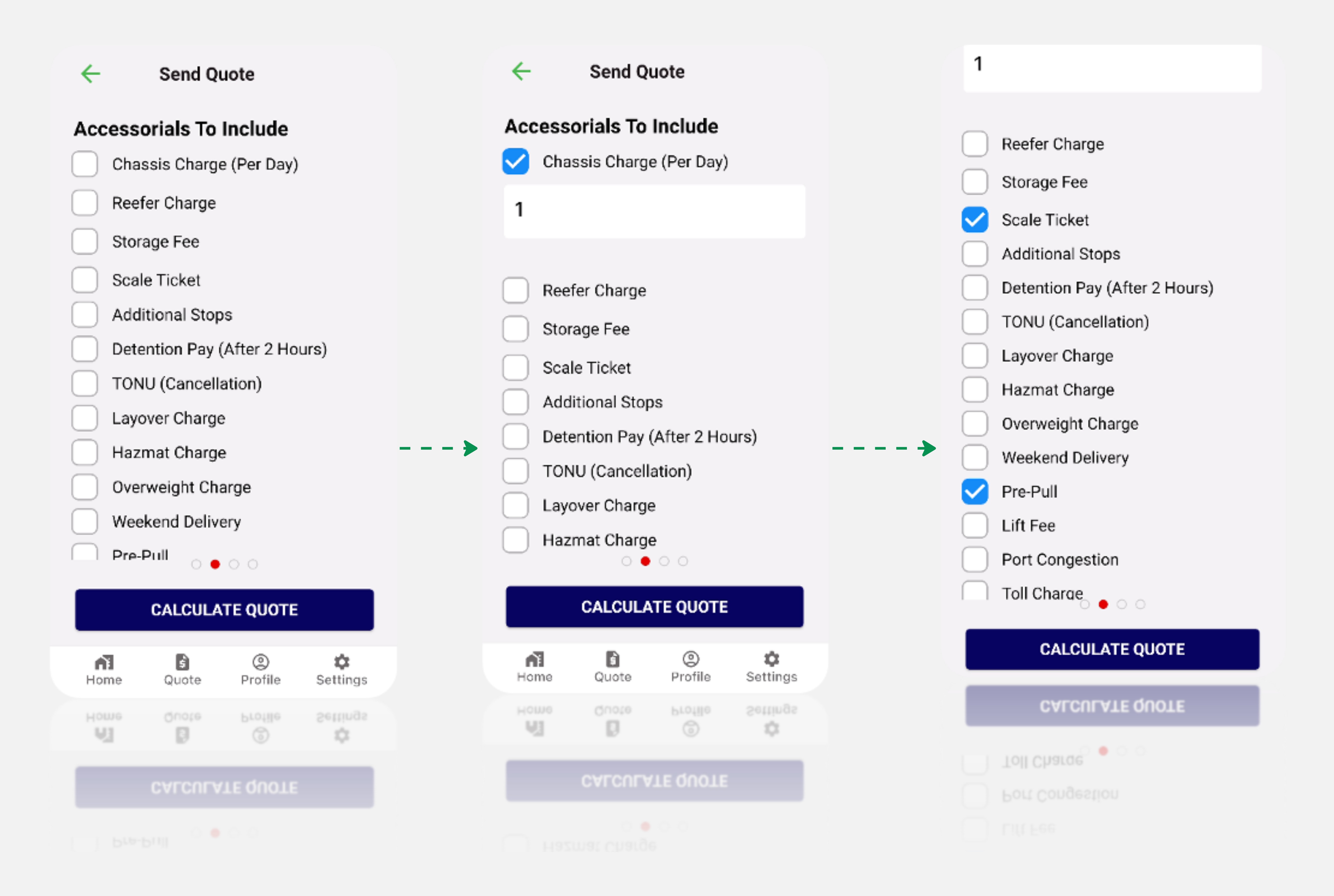
This section empowers users to enhance their quotes by including essential accessorials personalized to their specific shipment needs. Follow these steps to effortlessly integrate accessorials into your quote, This page provides you with the option to customize your quote with additional features before sending it to customer. Choose accessorials relevant to your shipment.
Remember
On the settings page, you've previously assigned rates to each accessory. These rates will be utilized to calculate the cost of each accessory based on your specified quantities.
Confirm that the chosen accessorials and quantities align with your shipment requirements.
If you are satisfied with your accessory selections, proceed to calculate your quote by clicking the 'Calculate Quote' button. The system seamlessly integrates accessory costs into your quote based on the rates configured in your settings. Take a moment for a final review to ensure accuracy before proceeding. If everything appears in order, initiate the quote calculation process, and the system will generate a quote reflecting the base cost along with any additional charges associated with the selected accessorials. This user-friendly process ensures a hassle-free and accurate integration of accessorials into your quote, allowing for a customized and detailed representation of your shipment costs.