Creating a Quote with Multiple Stops
The inclusion of multiple stops in quotes serves as a strategic approach to enhance efficiency, reduce costs, and provide a more customer-centric service. One key advantage is the ability to plan routes more effectively, optimizing the movement of goods by consolidating pickups and deliveries. This results in a streamlined transportation process, minimizing travel time, and maximizing the utilization of resources. If more stops are needed, click "Add Additional" at Quote page and provide the necessary details.
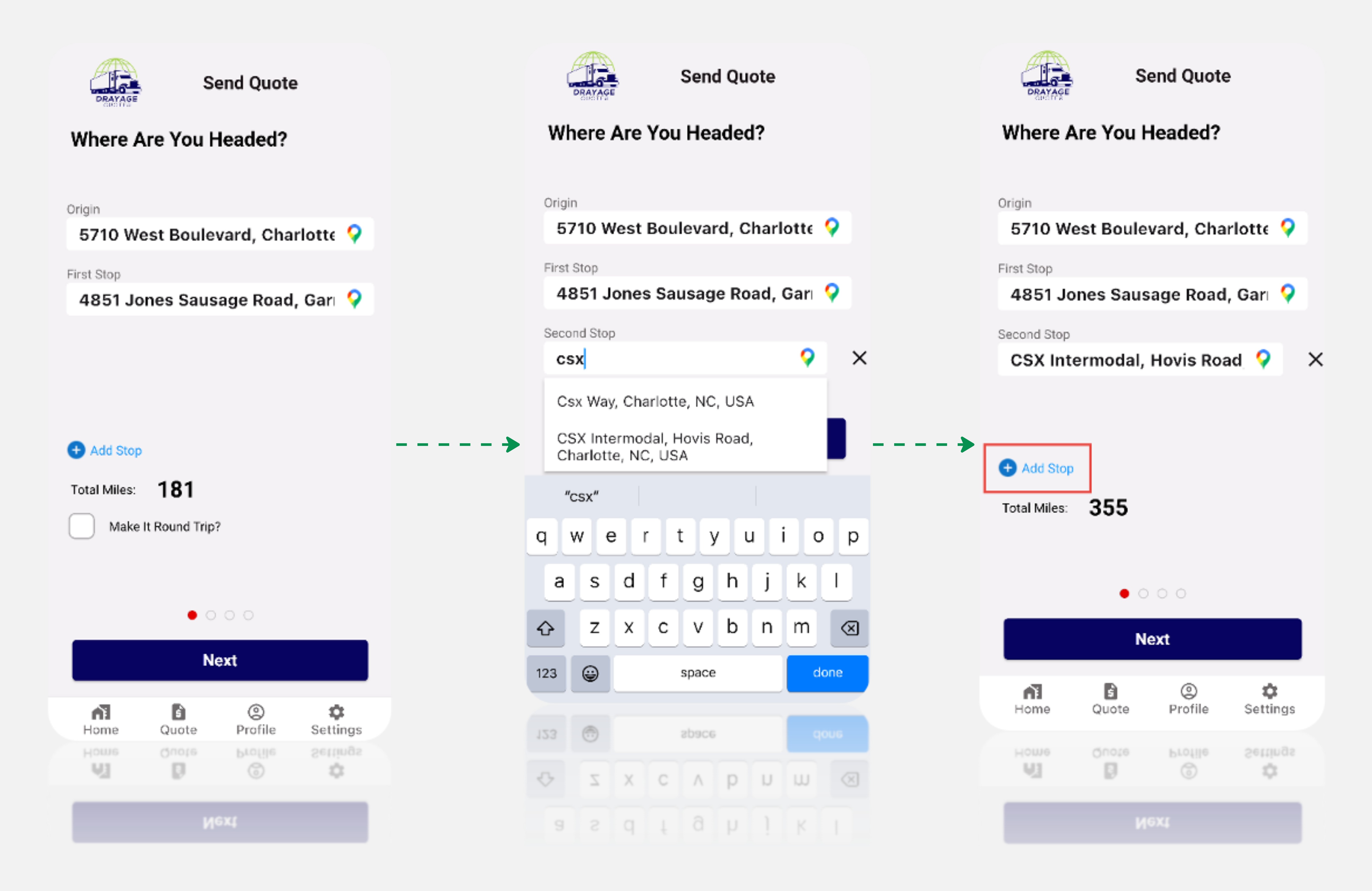
Confirm the accuracy of the stops, ensuring all pickup and delivery locations are correctly entered. If Carrier wants to remove any stops then they can do so by clicking on the ‘x’ next to the addresses. The system automatically calculates the total miles. Examine the details, including estimated fuel costs and potential profit. If satisfied, proceed by clicking "Next."
This user-friendly process enables the creation of a comprehensive quote for shipments with multiple stops.
Tip
Ensure accuracy in details and accessorials, review the breakdown, and confidently send the quote to your customer for a transparent and informed quoting experience.
Proceeding to Next Step, once your decision is made, click "Next" to continue with the chosen pricing strategy, whether discounted or at the standard rate.